
Every time you open a website, retrieve a shared document or join an online game, you may be using services provided by servers. This guide explains how servers work and includes a small, tested example that you can run on your own computer.
What A Server Actually Is
A server is a computer or software process that provides a service to another computer or program, known as a client. When you open a website, your browser acts as a client requesting information. The web service responds with the material needed to display the page. When an employee opens a shared document from an office network, a file server may be providing access to the stored file.
People often use the word server to describe both the physical machine and the application that runs on it. These meanings are related but not interchangeable. A single physical machine might run a web server, a database server and a file-sharing service at the same time. Conversely, an online service that appears to be one server could actually operate across many machines.
The defining feature is the role of providing a service. A small computer in a home can provide files to another device, while a rack of enterprise equipment can handle requests from many simultaneous users. Neither the physical size nor the purchase price determines whether a system is acting as a server. The MDN server glossary and IBM client-server documentation distinguish these software and hardware meanings.
How Clients And Servers Communicate
A client requests a resource or asks the server to perform a supported operation. The server processes that request and returns a response. A network protocol defines the format and meaning of these exchanges. Different services use different protocols, but the general pattern of requesting and providing a service is widespread.
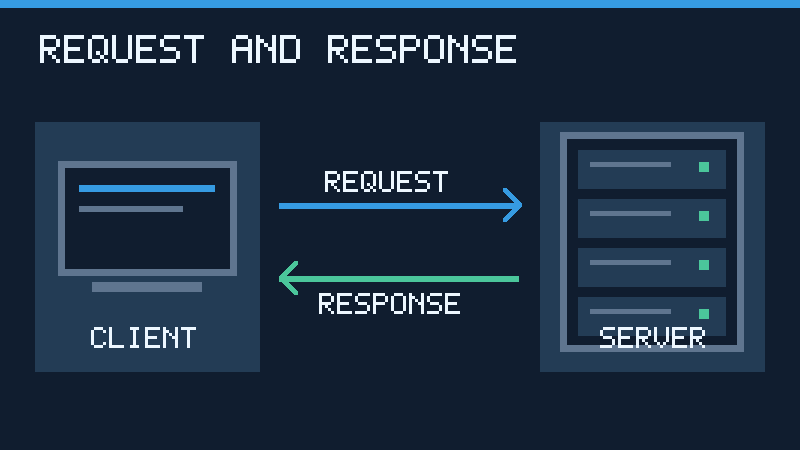
Consider an online store. A browser requests a product page. The web application may retrieve current stock information from a database and construct a response. The database is acting as a server to the application, while the application participates in serving the browser. One program can be a client in one exchange and a server in another.
Not all communication consists of short, isolated requests followed immediately by responses. Some services retain connections, send notifications or stream information over time. The details depend on the protocol and application design. For network fundamentals, read What Is A Computer Network?.
What Happens When You Visit A Website
When you enter a website address, the browser must locate a suitable service for that address. The Domain Name System can supply records that help the browser determine where to connect. A new lookup may not be necessary if relevant information has already been cached.
- The browser interprets the requested URL and obtains the necessary network addressing information.
- It establishes a connection to the relevant service, using the appropriate transport and security procedures.
- It sends an HTTP request for the desired resource.
- The server or another component of the hosting infrastructure prepares an HTTP response.
- The browser interprets the response and may make additional requests for images, styles or data.
The server that receives the request might be a content delivery network edge, a reverse proxy or a directly accessible application server. A request does not necessarily travel straight to the machine that holds the original content. HTTPS protects the HTTP exchange in transit through encryption and authentication of the connection, but it does not guarantee that the website itself is trustworthy.
MDN’s HTTP overview explains the web request and response model. Our DNS guide explains how name resolution fits into the process.
Common Types Of Servers And Their Responsibilities
| Server Type | What It Provides | Example Use |
|---|---|---|
| Web | HTTP responses and web resources | A company website |
| Application | Application logic and operations | Checking stock or processing an authenticated request |
| Database | Structured data access and management | Retrieving account or product information |
| File | Shared access to stored files | A team’s document folder |
| DNS | Name resolution or authoritative DNS records | Finding the address associated with a hostname |
| DHCP | Automatic network configuration information | Assigning an address to a newly connected device |
| Email transmission or mailbox access | Sending and retrieving messages | |
| Game | Shared game state and multiplayer sessions | Coordinating players in an online match |
These are logical responsibilities rather than mandatory categories of hardware. A small business may combine services on one system, whereas a larger organization may separate them for performance, maintenance and security. Microsoft’s Windows Server roles documentation provides examples of services available on a server operating system. Cloudflare’s DNS server explanation illustrates why even a single service category can include several specialized roles.
Physical Servers, Virtual Servers And Containers
A physical server is an actual computer with processors, memory, storage and network interfaces. It may be a tower, a rack-mounted machine or another purpose-built device. Enterprise servers often provide hardware features for reliability and management, although particular features vary by model.
A virtual machine is an isolated computing environment built using a virtualization layer. Multiple virtual machines can share one physical host, each with its own guest operating system and allocated resources. A virtual server is commonly delivered as a virtual machine that runs one or more server processes. Its isolation and performance depend on the virtualization platform and configuration.
Containers usually share the host operating system kernel while packaging applications together with the software environment they need. They can be useful for deploying separate services without assigning a full guest operating system to every instance. Containers are not identical to virtual machines and should not automatically be assumed to provide the same isolation boundaries.
Cloud hosting is another deployment choice. A provider may rent virtual machines, offer managed databases or execute applications without requiring the customer to administer an individual server instance. Physical computers still exist somewhere in the infrastructure. The difference is the amount of responsibility handled by the provider.
Server Vs Desktop Computer, Router And Hosting
A desktop computer is often designed around interactive use by one person. A dedicated server is typically configured around providing services to clients, maintaining availability and controlling access. It may run without a regular display or keyboard and be administered remotely. However, an ordinary computer can still act as a server when it runs suitable software.
A router primarily forwards traffic between networks. A home router also commonly provides several services, such as local DHCP and DNS forwarding. That does not make its primary routing function equivalent to web hosting. See What Is A Router? for the distinction.
Hosting is the arrangement through which a website or application is made available on computing infrastructure. It can be shared, virtual, dedicated or managed. A hosting account is not necessarily an entire machine reserved for one customer. A managed hosting service may handle much of the maintenance that would otherwise fall to the owner.
Server hardware also depends on device and platform firmware for low-level control and startup. Our firmware guide explains that distinct layer.
What Makes A Server Reliable And Secure
Performance depends on the workload. A service that processes thousands of database queries may require different memory and storage resources from one delivering video. The number of simultaneous users, their request patterns and the response time they expect all influence the design. A high processor specification alone does not prove that a server can meet a particular workload.
Reliability involves more than keeping a computer switched on. Regular monitoring, appropriate capacity, maintenance procedures, tested backups and recovery plans help reduce the impact of faults. Redundant disks or multiple servers may allow a service to survive certain failures, but redundancy is not a replacement for an independent backup. Accidental deletion or corrupted information can also be replicated.
Security requires appropriate access control, supported software updates, protected credentials and a network configuration that exposes only necessary services. A database used by a website, for instance, often does not need to accept unrestricted connections from the internet. The correct configuration depends on the service and its intended clients.
Server operating systems provide foundations for these tasks. Microsoft’s Windows Server overview describes an enterprise platform that supports various deployment models. Linux-based environments are also widely used. The operating system should be chosen according to supported applications, maintenance capabilities and operational requirements.
Try A Small Local Web Server Yourself
You can observe the client-server relationship on a single computer without paying for hosting or exposing files to the internet. This exercise assumes Python 3 is installed and uses a new folder containing only a harmless test file. Check that you are permitted to run development tools on the computer.
- Create a new empty practice folder. Do not use your Documents folder, home directory or a folder containing confidential files.
- Using a plain text editor, create a file called
index.htmlin that folder. Save the following content.
<h1>Hello Server</h1>- Open a terminal in the practice folder and run the following command.
python -m http.server --bind 127.0.0.1 8000If your system uses the executable name python3, substitute it. If port 8000 is already occupied, choose another unused local port and change the browser address accordingly.
- Open
http://127.0.0.1:8000/in your browser. The page should display Hello Server. - Open
http://127.0.0.1:8000/missing.html. Since there is no such file in the practice folder, the server should return a not-found response. - Look at the request messages in the terminal. Stop the server with Ctrl + C when the exercise is complete.
The basic example was verified locally with Python 3.13.5 using an available loopback port. The existing page returned HTTP 200 and contained the expected heading, while the nonexistent file returned HTTP 404. This confirms the response behavior in the tested environment, not every operating system’s command launcher or browser interface.
Safety note: The loopback address 127.0.0.1 limits the listening interface to the local machine in this example. Do not remove the binding option, configure port forwarding or expose your practice server to other networks. Python’s http.server documentation warns that this module is not intended for production deployment. If you need help opening a terminal, read What Is A Command Line?.
What Server Errors Mean To A Client
An error displayed in a browser can come from several layers. A network connection might fail before an HTTP exchange even occurs. Alternatively, a service may respond with an HTTP status that indicates an error or access restriction. Identifying which event happened helps avoid unnecessary troubleshooting.
| Observation | General Meaning |
|---|---|
| 200 OK | The HTTP request succeeded according to the response. |
| 403 Forbidden | The responding service refuses the requested access. |
| 404 Not Found | The responding service reports that the resource was not found, or is unwilling to disclose its existence. |
| 500 Internal Server Error | The responding service encountered an unexpected condition. |
| 503 Service Unavailable | The service is temporarily unable to handle the request. |
| Connection timeout | The expected connection or communication did not complete in time. |
A 404 does not establish that a server is offline. It establishes that a responding HTTP service returned a not-found status. Conversely, a connection timeout does not always establish a server failure; connectivity problems, filtering and other intermediaries can prevent communication. Compare the behavior on another authorized device or connection when appropriate, and avoid repeatedly submitting sensitive transactions when their outcome is uncertain.
Frequently Asked Questions
Is A Server Just A Computer?
A server can mean a physical computer or a software process that provides services to clients. The term describes its role as well as, in some contexts, its hardware.
Can A Normal PC Be Used As A Server?
Yes, a suitable ordinary computer can run server software. Its capacity, reliability and security must be appropriate for the intended use.
Does A Server Always Need Internet Access?
No, a server can provide services on a local network or even to programs on its own computer.
Is A Server The Same As The Cloud?
No, cloud services use computing infrastructure that includes servers. A cloud provider may manage one or more layers of that infrastructure for customers.
Can One Server Run Several Services?
Yes, when its software, resources and security configuration support the intended workload.
What Happens When A Server Goes Down?
Its clients may temporarily lose the affected service unless another component can provide the required functionality.
Is Python’s Built-In Web Server Suitable For A Public Website?
No, it is intended for simple development and testing, not a production deployment.
Technical References
Technical review: November 15, 2026. Sources: MDN Server Glossary, IBM Client-Server Model, MDN Web Server Guide, MDN HTTP Overview, Windows Server Overview, Windows Server Roles, Cloudflare DNS Server Guide and Python HTTP Server Documentation. The diagrams are original conceptual illustrations. Only the local HTTP exercise was executed; production server configuration and hardware performance were not tested.


