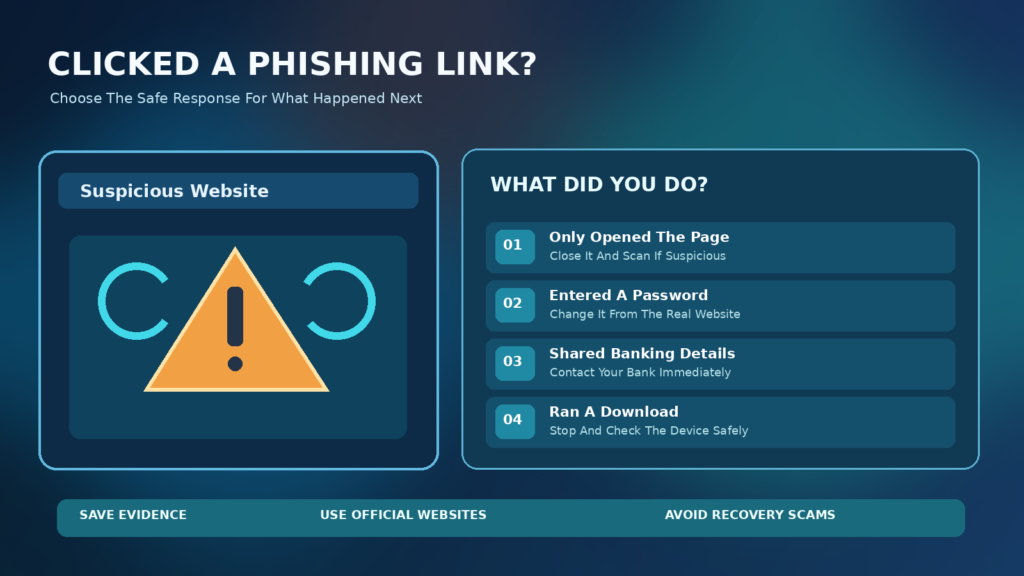

This incident-response guide separates accidental page visits from credential theft, unauthorized payments, suspicious downloads and active malware. It draws on official guidance from the FTC, CISA and Microsoft, and avoids fear-based instructions that treat every click as a confirmed infection.
Start By Identifying What Actually Happened
Clicking a suspicious link is alarming, but the next response depends on what you did after opening it. A link can lead to a page that simply attempts to collect information, starts a download, asks you to install software or redirects through another site. Opening a webpage is not the same event as entering a password, approving an account login or executing an installer. Each action changes the type and urgency of the risk.
First stop interacting with the suspicious page, close the tab and do not follow any additional instructions it displays. Do not call a support number shown on that page or accept a notification permission prompt. Record whether you entered information, downloaded a file, installed software, scanned a QR code or approved a verification request. The FTC’s phishing guidance advises using trusted contact channels rather than responding to suspicious messages.
Close And Check
Secure Account
Call Bank
Contain And Scan
If You Only Opened The Link
If you opened the page but did not enter information or run a file, close it and stop interacting. That does not guarantee there is no risk, because browser vulnerabilities and deceptive downloads can exist, but it also does not prove the device was infected or that your accounts were stolen. Avoid jumping to a factory reset based solely on the fact that the site loaded.
Check whether the browser downloaded anything or requested permission to send notifications. Keep the operating system and browser updated through official channels. For a suspicious link that might have delivered malware, the FTC recommends updating security software and scanning. Review the results before taking more disruptive actions, and do not run the link again for testing.
If You Typed Your Account Password
If you entered a password into a deceptive page, treat that credential as exposed. From a trusted browser and preferably a known-clean device, reach the real service by typing its official address or using its saved app, not by clicking the phishing message again. Change the affected password promptly to a strong unique value. If the same password was reused elsewhere, change it on those other accounts too.
Use the account’s official security page to review recent sign-ins, log out unknown sessions, check recovery phone numbers and email addresses, and remove unfamiliar linked apps. These steps matter because changing a password does not always invalidate every existing session or undo malicious recovery changes. Our Password Manager Guide helps create unique credentials without relying on easily guessed variations.
If You Shared A One-Time Code Or Approved A Prompt
A one-time verification code or unexpected approval prompt can be the missing factor an attacker needs to complete a sign-in. The FTC warns that unexpected requests to share verification codes are a scam indicator in its verification code guidance. Do not supply any further codes even if a caller claims they are trying to reverse the problem.
Open the legitimate account through a trusted route and inspect security events, devices and recovery methods. If the account is already compromised or access has changed, begin the provider’s account-recovery procedure immediately. Reset credentials where possible and secure the associated email account. Multi-factor authentication is valuable, but it is not a guarantee against every real-time phishing attempt. Our Two-Factor Authentication Guide explains the differences between available methods.
If You Entered Card Or Banking Information
Treat card numbers, banking credentials and payment details as urgent exposure. Contact the bank or card issuer using the official number on your card, banking app or institution’s website. Explain precisely which information was entered and ask about appropriate account protection, card replacement, transaction monitoring and reporting. Do not call a number that appears in the suspicious message.
If you authorized a payment or transfer, report it immediately and ask the institution about any available dispute, reversal or fraud process. There is no universal guarantee that a completed payment can be recovered. The FTC’s scam recovery guidance distinguishes actions according to the payment method. Preserve confirmation numbers and your case reference, and watch for follow-up impersonation attempts.
If You Shared Identity Information
If the page obtained a national identification number, date of birth, home address or sensitive identity document, the response depends on what was exposed and the country in which the information can be used. In the United States, IdentityTheft.gov provides a personalized recovery plan and explains fraud alerts, credit freezes and correction of fraudulent accounts. People elsewhere should use their local identity-protection and financial reporting authorities.
Do not assume every email address or name exposure is identical to a stolen government identifier. Record the specific fields submitted and monitor the accounts that depend on them. If you shared copies of documents, contact the relevant institution about available safeguards. Be cautious of services claiming they can delete stolen information from every criminal database for a guaranteed fee.
If A File Downloaded Automatically
A suspicious page might cause a file to appear in Downloads without your intentionally saving it. A downloaded file is not necessarily executed, but it still warrants caution. Do not open it or approve a Windows security warning merely to see what it contains. Note its filename and source in a private record, then scan it using a trusted, updated security product or ask your organization’s IT team to inspect it.
Microsoft documents how the Windows Attachment Manager can mark files obtained from the internet and show warnings before opening them in its Attachment Manager reference. Do not remove those protections to get past a warning. If a security scan finds a threat, follow the product’s official remediation instructions and avoid manually experimenting with suspicious executables.
If You Installed Or Ran A Suspicious Program
Running an unknown installer presents a different risk from merely viewing a web page. If you suspect malware is active, stop entering passwords or financial details on that device. For a work-managed computer, report it promptly to your security or IT staff and follow their incident procedure. For a personal computer, a temporary network disconnection may help contain an active suspicious process while you arrange appropriate scanning or professional assistance.
Use a separate trusted device for essential account password changes if the affected computer may be compromised. A malicious program might monitor input or sessions, making changes performed on the infected device less reliable. The FTC’s malware recovery advice and Microsoft’s Windows Security instructions support scanning and informed remediation rather than trusting a pop-up that promises instant cleanup.
A Safe Windows Security Scan
On a Windows PC, open the built-in Windows Security app through Start or the system settings, then go to Virus & threat protection. Use the supported scan options appropriate to the concern. Microsoft documents Quick Scan for common threat locations, with other scan types available where needed. Update security intelligence when possible through legitimate Windows controls.
If malware is suspected but cannot be removed during normal operation, Microsoft describes Defender Offline scanning under appropriate conditions in its Defender Scan Guide. Save work before any scan that requires restarting. A clean scan is useful evidence but does not conclusively prove no unwanted software or stolen credentials remain. Our What Is Malware article explains common forms of malicious software.
Do Not Trust Fake Browser Warning Pop-Ups
Phishing pages sometimes display full-screen messages saying the device is infected, that files will be deleted, or that you must call a phone number immediately. A website can draw a frightening warning without having privileged access to the operating system. Do not give remote control to an unsolicited helper or install a recommended cleaner from the page.
Close the page through your browser controls. If it refuses to close or repeatedly opens, use normal application closing methods and seek official browser or operating-system support. Do not enter payment details into a technical support form reached through a scare message. Our Fake Software Download Button Guide covers another way deceptive webpages persuade visitors to install unsafe software.
How To Check Whether An Account Was Changed
After securing the password from a trusted device, look at the legitimate service’s account security page. Review sign-in history, recovery email addresses, phone numbers, forwarding rules, connected apps and persistent sessions where the provider exposes them. Unauthorized email forwarding can allow a compromised mailbox to leak messages even after a password change.
Do not delete every unfamiliar-looking security record before documenting it. Some entries can be routine provider infrastructure, while others deserve investigation. Record approximate timestamps and follow the service’s recovery workflow. If your email was compromised, secure it first because it may control recovery of banking, social, shopping and work accounts.
What To Do If A Social Account Was Accessed
Attackers may use a stolen social-media session to send phishing messages to friends or impersonate the account owner. Use the platform’s official account recovery or security settings, change passwords, review trusted devices and remove unauthorized connections. Tell contacts not to trust recent unexpected links from the account while you investigate.
If you cannot sign in, do not pay people on social networks who claim they can hack the account back. The FTC’s account recovery guidance recommends using supported provider pathways. Keep a record of when access was lost and what actions you took, but avoid broadcasting personal recovery details publicly.
What To Do On An iPhone Or Android Phone
On a phone, ask whether you merely visited a site, granted browser notification permission, installed an app, entered credentials or approved an account request. The appropriate response differs. Close the suspicious page, inspect recent downloads and installed applications through the device’s normal settings, and update the browser and operating system through official update channels. Do not assume that the same Windows scanning steps apply directly to iOS or Android.
If you entered passwords, prioritize account security from a trusted device. If you installed a configuration profile, sideloaded application or unknown management component, seek platform-specific official support before removing business-managed settings. For suspicious SMS messages, the FTC’s spam text guide explains reporting and avoidance. A browser page alone is not proof of a fully compromised phone.
Why Clearing Browser History Is Not Enough
Deleting browsing history may remove local records of visited pages, but it does not invalidate a stolen password, reverse a bank transfer or necessarily remove installed malware. Clearing cookies can sometimes log you out of websites, which may be useful in a specific session-related recovery, but it should not replace the account provider’s official sign-out and session-revocation controls.
If you need evidence for a workplace incident or fraud complaint, avoid destroying useful records before speaking with the appropriate team. Preserve the phishing message, approximate link address, time, sender and any relevant payment record without repeatedly reopening dangerous content. A useful incident report is accurate, concise and avoids exposing private credentials.
How To Report The Phishing Message
Use the mail or messaging application’s built-in Report Phishing, Report Junk or equivalent option where supported. For US consumer scams, you can report to ReportFraud.ftc.gov. The FTC explains broader recovery steps in its official phishing guide. Other countries have their own reporting channels; use recognized government or institutional contacts.
At work or school, report the message to the organization’s security team immediately, especially if you entered credentials or installed something. If the fraudulent page impersonated a financial provider, use the real provider’s abuse-reporting process. Do not attach passwords or authentication codes to the report. A report can help investigators detect a campaign even when the person reporting has not suffered confirmed financial loss.
How To Tell A Real Recovery Message From A Second Scam
People who report scams may later receive messages claiming that a security expert, government agent or recovery service can recover funds or remove malware for an advance fee. Such follow-up approaches can be another scam. The FTC’s recovery scam warning explains that criminals may target people who have already suffered loss.
Use only contacts independently obtained from the genuine bank, service provider, regulator or established security vendor. An official-looking badge, case number or copied logo does not verify a sender. Never share a new verification code with someone who contacts you unexpectedly about your previous incident.
When To Contact Your Employer Or School
A phishing link clicked on a managed account or work device should be reported to the designated team promptly. The organization may need to review authentication events, restrict a session, isolate a device or notify other employees. Do not conceal a mistake for fear of embarrassment or attempt to investigate organizational systems without permission.
Provide a factual timeline: how the message arrived, which link was used, whether anything was entered or downloaded and which device was involved. If you do not know whether a program ran, say so rather than guessing. Security staff can evaluate the risk while protecting evidence and minimizing operational disruption. Follow their instructions rather than general consumer reset guides when a device is company-managed.
A Practical Decision Table For The First Hour
The first hour is a useful period to stop further interaction and secure exposed credentials or accounts, but there is no universal promise that every risk can be removed within sixty minutes. Prioritize according to evidence of exposure. Simply viewing a page calls for different steps from giving a banking password or executing software.
If you are unsure, write down the actions you remember before making changes. The table below groups the response by event rather than treating every click as a confirmed infection. Where a bank account, employer system or identity record is affected, contact the relevant authority as soon as possible rather than waiting to complete every device check.
| What Happened | Primary Next Step | Who To Contact |
|---|---|---|
| Viewed Page Only | Close, Review Downloads, Update And Scan If Suspicious | Browser Or Security Support As Needed |
| Entered Account Password | Change Through Official Site, Check Sessions | Account Provider |
| Entered One-Time Code | Review Or Recover The Account Immediately | Account Security Team |
| Shared Banking Details | Report And Secure Financial Account | Bank Or Card Issuer |
| Ran Suspicious Software | Stop Sensitive Activity, Contain And Scan | Trusted Security Team |
| Shared Government Identifier | Follow Relevant Identity Recovery Process | Official Identity Protection Agency |
Prevent Repeat Phishing Without Becoming Overconfident
Scams frequently use urgent stories about missed deliveries, unusual payments, expiring accounts or security warnings. A message may copy a legitimate logo or appear inside a genuine conversation. The safest general rule is to use the real service’s app or independently typed website rather than a link in an unexpected demand. The FTC phishing prevention guidance emphasizes independent verification and multi-factor authentication.
Password managers can reduce password reuse and may help identify mismatched website origins, while stronger authentication can make some attacks harder. Neither tool eliminates all scams, especially if a person is tricked into approving a live sign-in. Our Website Safety Checklist covers domain inspection and other signals before entering credentials.
How To Keep A Clear Incident Record
Write down the approximate date, time and timezone, the message channel, any account involved, whether a file was downloaded and what steps were completed. Keep the suspicious URL as text only in a private record and avoid clicking it again. If a bank has opened a fraud case, preserve its reference number and the official contacts used.
Do not publish an incident record containing personal addresses, account numbers, passwords or private correspondence. For a workplace event, follow the employer’s evidence-handling rules instead. An accurate timeline can help separate a confirmed compromise from a plausible concern and prevent repeated password changes or unnecessary device resets.
How To Know When To Escalate
Contact a bank immediately if payment credentials were exposed or an unauthorized transaction appears. Contact the service provider’s recovery team when you cannot regain control of an account or find unknown sessions. Seek professional security assistance when malware alerts persist, unknown software gains elevated access or a device handles sensitive business information.
A trusted security expert can help investigate without promising absolute certainty from one scan. For possible US identity theft, the official IdentityTheft.gov recovery portal provides structured next steps. Elsewhere, consult local agencies. Avoid unverified phone numbers found in search advertisements or urgent pop-ups.
A Safe Follow-Up Checklist
After the immediate response, verify that exposed passwords have been changed, relevant accounts have been reviewed and strong authentication is enabled. Follow up with the bank or provider using their official case numbers. Keep software updates current, review unfamiliar downloads and monitor accounts for unusual activity over a reasonable period.
Delete or report the original phishing message through supported channels after preserving any evidence needed by your organization or financial institution. Learn how the deception worked so you can recognize similar requests later. The central principle is proportional response: close and scan after an uncertain link click, secure accounts after credential exposure, involve financial institutions for payment details and treat executed suspicious software as a device-security incident.
Frequently Asked Questions
I Clicked A Phishing Link But Entered Nothing. Am I Safe?
Risk is often lower than when you submit credentials or run malware, but it is not guaranteed to be zero. Close the page, review downloads, keep security software updated and run an appropriate scan if suspicious.
Should I Change My Password After Only Opening A Page?
Not automatically. If you entered the password or have evidence of account compromise, change it promptly through the legitimate service. Review account activity when uncertain.
What If I Entered My Password On A Fake Website?
Change the affected password from a trusted device, replace it wherever reused, review sign-ins and recovery methods, and enable suitable multi-factor authentication.
What If I Gave A Verification Code To A Scammer?
Treat the associated account as potentially compromised. Use the real provider’s security or recovery tools immediately and review sessions, credentials and recovery methods.
What If The Phishing Link Downloaded A File?
Do not execute it. Use reputable updated security software or your organization’s security team to inspect and handle it safely.
Should I Disconnect From Wi-Fi After Clicking A Phishing Link?
A temporary disconnection may be appropriate if you suspect active malware after executing software, but merely opening a page does not always justify disconnecting. Prioritize the action that matches the evidence.
What If I Entered Credit Card Details?
Contact the issuer or bank immediately using its official number, explain the exposure and ask about protection, monitoring, card replacement and any dispute options.
Does Clearing Browser History Remove Phishing Malware?
No. History deletion does not remove installed malware, invalidate stolen credentials or undo financial transactions. Use the relevant security and account recovery procedures.
Where Can I Report Phishing In The United States?
Use your mail provider’s reporting option and ReportFraud.ftc.gov where appropriate. For identity theft recovery, consult IdentityTheft.gov.
Can A Recovery Company Guarantee My Money Back?
No. Be cautious of unsolicited recovery offers and advance fees. Contact your financial institution and recognized authorities directly.


