
A Python package installation can fail with Permission denied, Access is denied, WinError 5, or an externally-managed-environment message. The solution depends on which Python interpreter is running and what directory pip is trying to change. For ordinary project dependencies, the safest starting point is a user-owned virtual environment, not an administrator terminal or a command that weakens system permissions.
Source And Testing Disclosure: The procedures below were checked against official Python packaging and pip documentation in November 2026. They are not a claim that each operating-system and package combination has been tested on a physical machine.
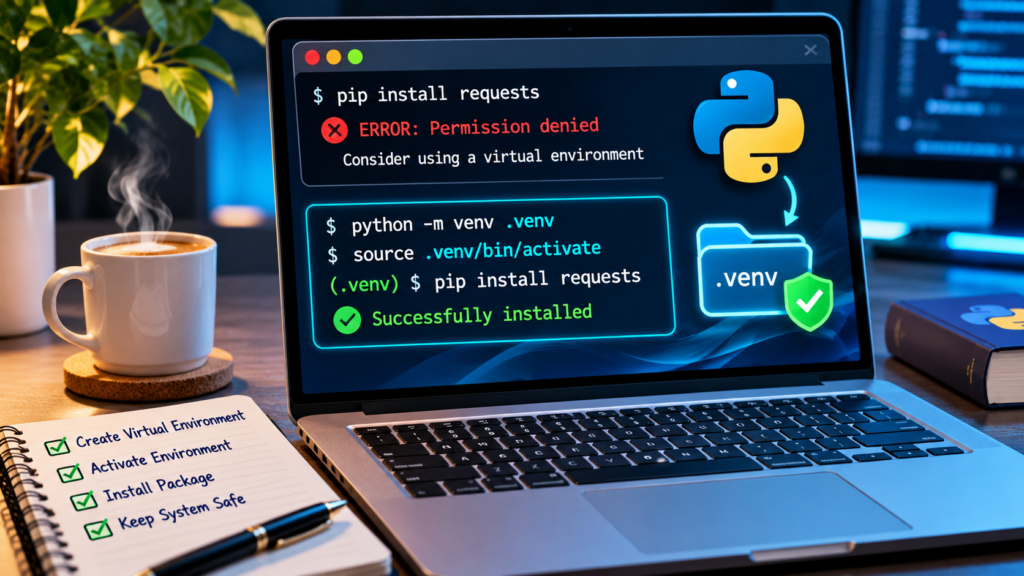
Open your project folder, run python -m venv .venv (or py -m venv .venv on supported Windows installations), and use that environment’s Python to run python -m pip install PACKAGE_NAME. Check the full error path and interpreter before changing ownership or permissions. For externally managed Linux Python, use the distribution’s documented workflow or a venv instead of overriding system protections.
Quick Command Reference
| Platform | Command | Purpose |
|---|---|---|
| Windows | py -m venv .venv | Create Project Environment |
| Windows Command Prompt | .venv\Scripts\activate.bat | Activate Environment |
| Windows PowerShell | .venv\Scripts\Activate.ps1 | Activate If Allowed |
| Linux Or macOS | python3 -m venv .venv | Create Project Environment |
| Linux Or macOS | source .venv/bin/activate | Activate Environment |
| Inside Environment | python -m pip install requests | Install Trusted Example Package |
Recognize The Exact Pip Error
A message containing Permission denied, Access is denied, WinError 5, or inability to write to site-packages tells you that an installation process could not modify its destination. These messages can look similar but do not always have the same cause. A Windows installation into Program Files has different permissions from a Python installation inside a personal project directory, and a Linux system interpreter may be protected by a distribution policy. Before copying a command from the internet, read the complete traceback and identify the directory pip was trying to write. Note the operating system, Python interpreter, package name and whether you are inside a virtual environment.
Do not treat a permission error as evidence that every Python directory should be made writable by everyone. Avoid changing permissions on system folders before understanding which Python installation the command targets. If your traceback mentions an externally managed environment instead of a normal file permission, follow the dedicated system-Python section below; elevating the installer may not be the appropriate repair.
Understand Why System Python Is Protected
Operating systems and other applications can depend on a shared Python installation and its packages. Replacing those packages with whatever version a personal project needs can disrupt tools outside that project. Some Linux distributions mark their Python environment as externally managed so Python-specific package managers do not overwrite distribution-managed files. Permission restrictions on system Python are often intentional rather than accidental. A new project normally does not need privileged writes to a machine-wide directory.
The Python Packaging User Guide recommends project-specific virtual environments because they isolate installed dependencies and avoid conflicts across projects. This is the default strategy for the procedures that follow. It also makes experiments easier to reverse: removing a project environment is different from modifying the operating system’s global interpreter. If you maintain a production server, follow its administrator’s documented deployment method instead of changing shared packages on an active machine.
Check Which Python Interpreter Runs Pip
A common trap is having more than one Python installed. The command pip may belong to a different interpreter from the python command used to run your script. In a terminal, inspect python –version and python -m pip –version on systems where Python is on the path. On Windows, the Python install manager or launcher may provide py commands; verify the installed environment instead of assuming a global executable. The pip version output normally includes its installation path, which helps reveal where packages will go.
Prefer the form python -m pip when operating in an already selected environment because it uses pip as a module of that interpreter. On systems where python3 is the supported command, use python3 -m pip. If a tool or IDE uses another interpreter, match your installation command to the interpreter configured there. Our VS Code Terminal guide explains why terminal context matters when developing projects.
Record The Target Directory Before Making Changes
Look for the path in the error that pip tried to create, remove or replace. A protected system directory, a path under another account, and a local folder containing files owned by a different user are distinct situations. On Windows, installation destinations may live in Program Files, user profile locations, or project virtual environments. On Linux and macOS, a shared prefix such as /usr or a home-directory project also changes the analysis.
Do not delete the destination directory merely because it appears in the traceback. Existing packages may be required by software that you did not intend to modify. If a personal project folder has unusual ownership, ask how it was created and whether a previous elevated command changed file permissions. Correcting the project’s ownership is a different task from granting universal write permission to a system-wide Python directory.
Create A Project Folder You Control
Choose a normal working directory inside your user profile, such as a development folder or a specific project repository. Keep it separate from operating-system and vendor-managed directories. Open a terminal there before creating the environment. This reduces permission complexity and makes it obvious which files belong to the project. If your project lives in a protected corporate workspace, use the location approved by your organization.
Creating a virtual environment in a user-owned project folder does not give you permission to install untrusted software. Verify the package’s publisher and intended dependency before running any installer. Our Fake Software Download Button guide explains why download origin matters. The preferred installation destination solves many permission problems, but package trust and security review remain independent requirements.
Create A Virtual Environment On Windows
From the project directory, use the supported Python interpreter to create an isolated environment. On many Windows installations the command is py -m venv .venv; other installations may use python -m venv .venv. The dot-prefixed folder is a conventional local environment name, not a special required folder. Check that the command completes and creates its own Scripts directory.
The virtual environment contains an interpreter and project-specific package location. It does not copy or alter every system library. The Python documentation describes venv as the standard mechanism for managing isolated environments. If Python is not recognized, resolve the Python installation and interpreter selection first instead of repeating pip with administrator permissions. Use a known-supported Python installer and avoid unverified ‘repair Python’ programs.
Create A Virtual Environment On Linux Or macOS
Open a terminal in a user-owned project directory and run python3 -m venv .venv when that Python build provides the venv module. On some Linux distributions, a separate OS package may be required to supply venv support for the distribution’s Python version. In that case, use the distribution’s documented package-manager instructions rather than a random bootstrap script.
The environment should be created by your own account and stored somewhere you can normally write. Avoid running sudo python3 -m venv for an ordinary personal project because that may leave the environment owned by root and create another permission problem later. If this is a server or shared development environment, follow its established policy on project directories and interpreter management.
Activate The Environment Or Use Its Interpreter Directly
Windows PowerShell generally activates the environment through .venv\Scripts\Activate.ps1, while Windows Command Prompt uses .venv\Scripts\activate.bat. On Linux and macOS shells, source .venv/bin/activate is commonly supported. Activation changes the current shell’s command resolution so python and pip point to the environment. Verify the active interpreter afterward instead of assuming the activation message guarantees the expected package destination.
Activation is convenient but not always necessary. You can invoke the environment’s Python executable directly, which can avoid changes to shell policies. If PowerShell blocks the activation script, do not blindly disable execution policy globally. Use Command Prompt activation or call the environment Python directly, or consult your organization’s supported policy. The standard Python packaging environment guide documents these platform-specific workflows.
Install The Package Inside The Environment
Once the correct environment is active, run python -m pip install followed by the package’s exact name, for example python -m pip install requests. Pip installs the distribution into the selected environment rather than trying to write into protected global site-packages. Wait for the installer to complete and read any new error instead of assuming all failure messages mean permission trouble.
For a reproducible project, prefer a checked requirements file or declared dependencies rather than repeatedly installing arbitrary versions. Verify that the installed package is intended for your Python version and platform. If a package has native extensions, additional build requirements may apply even when permissions are correct. Avoid turning off antivirus or changing system folder access because a build tool reports a different failure.
Verify The Installed Package And Interpreter
An installer displaying Successfully installed is only the first check. Run python -m pip show requests for the demonstration package, or import it from the same interpreter used by your project. Pip’s output can reveal the installation location. The script that imports the module must use the matching environment; installing to one Python interpreter and running another is a common reason people believe a package installation failed.
In a notebook or IDE, inspect its selected kernel or interpreter. For a project using VS Code, confirm the terminal and Run configuration target the same .venv directory. If pip reports successful installation but import fails, do not immediately reinstall Python or change ownership of global folders. First match the interpreter paths. This distinction saves time and prevents duplicate installations.
Fix A Permission Error Inside An Existing Virtual Environment
A virtual environment can still produce Permission denied if it was created by another account, copied from another computer, placed on a read-only drive, or previously modified using an elevated command. Check whether you can create an ordinary file in the project directory and whether the environment belongs to your user. Do not apply recursive chmod 777 or Windows Everyone Full Control to make the error disappear.
When the environment is clearly disposable and the project has a reproducible dependency list, it can be safer to create a fresh virtual environment under the correct user rather than repair hundreds of altered permissions. Preserve source code, configuration and secrets first. Deleting .venv should never be treated as permission to delete the entire project. On corporate machines, coordinate ownership changes with IT.
Recognize Externally Managed Environment Messages
On newer Linux distributions, an error may explicitly say externally-managed-environment. The Python packaging specification allows distributions to mark their system Python as managed by the OS so pip refuses certain global modifications. This message is not an invitation to bypass the protection as root. The recommended solution for application dependencies is usually a virtual environment, while distribution-provided packages should be managed by the OS package manager where appropriate.
Some pip versions provide an override such as –break-system-packages. It exists for specialized informed uses but is not the general fix recommended for beginners, because it can damage a distribution-managed Python installation. Do not add it to every tutorial command. Check the Externally Managed Environments specification and use the method supported by the specific distribution.
Know When User Install Is Suitable
Pip supports a –user installation mode that targets the user’s site-packages rather than the system-wide directory. This can be useful in certain personal configurations, but it is not always allowed or appropriate. Pip documentation notes that –user behaves differently inside virtual environments, and a distribution-managed Python installation may restrict system interpreter changes. A dedicated project venv is usually easier to reason about for application dependencies.
If you intentionally need a command-line application globally available to your user, a tool that manages isolated application environments, such as pipx, may be more suitable than mixing everything into a shared user site-packages location. Avoid automatically adding –user inside an active virtual environment where it may be ineffective or rejected. Select the installation scheme for the task, not merely the first command that avoids a warning.
Do Not Use Sudo Pip As A Default Repair
Running sudo pip install changes the authority of the process, potentially allowing modifications to operating-system-managed Python packages. That may make a permission error disappear while creating a larger dependency or security problem. A command that works only because it has root privileges is not evidence that it is safe. Many distributions intentionally prevent or discourage global pip changes.
Use sudo for OS package management only when your administrator or distribution explicitly calls for it. For a Python project’s third-party dependencies, isolate them under the developer’s account. If you previously ran pip as root in a user project and later receive permission errors, investigate whether its environment or cache directories became root-owned. Do not recursively seize ownership of unrelated shared directories.
Avoid Changing Access Control On System Python
Internet advice sometimes suggests granting everyone write access to Python’s installation directory or disabling controlled-folder protections to allow pip to install. Such a change weakens isolation and can enable unauthorized modifications. It is particularly risky on a computer with many users or a machine running privileged services. Fixing a local project by altering system ACLs is rarely proportional to the original problem.
If a legitimate managed application requires a system-wide package update, its administrator should use a supported package deployment process. Your first response as a developer should be a user-owned virtual environment and a clear interpreter path. Preserve any error report to explain why the chosen directory was not writable rather than masking the security boundary.
Check Windows User Access Without Turning Off Protection
On Windows, WinError 5 may arise if pip is trying to modify files in a directory your account cannot change, or if another process holds a file. Inspect whether the destination is a personal environment, protected installation, or temporary extraction directory. If the target is inside an approved user-owned project, check folder properties and whether the filesystem is read-only.
Do not disable antivirus or ransomware protection simply because an installer failed; the protection might have blocked a genuinely suspicious operation. If corporate endpoint policies are involved, contact IT with the exact blocked path and package details. A legitimate installation should use an authorized destination and trusted package source. If the correct venv remains blocked, a security or filesystem issue deserves separate investigation.
Use A Safe Cache Diagnosis
Pip caches downloaded distributions to speed repeated installs. In unusual cases a cache directory may be inaccessible because of ownership or damaged files. However, a cache error does not mean you should delete every folder under your user profile. Read the traceback carefully and identify the actual cache path. Pip offers documented cache-management options and the ability to bypass the cache for a controlled installation test.
Use pip cache information commands where supported and preserve logs if permissions remain wrong. The no-cache-dir option may help isolate cache-specific failures, but it does not repair an unwritable target site-packages directory. Prefer a clean project environment and only remove cache data when you understand the consequences. Shared build servers may rely on controlled caches that require administrator approval before clearing.
Distinguish File-In-Use Errors From Permission Errors
A running Python process, IDE, notebook kernel or antivirus scanner may hold a file that pip wants to replace. Windows sometimes reports access or sharing failures during an upgrade even when the account normally has permission. Save your work and close the Python process or notebook that is using the relevant package, then retry inside the selected environment.
Do not terminate unrelated system processes or force close a production application without authorization. A reproducible package update should occur during a controlled maintenance window when the environment is not actively in use. If a package repeatedly fails with a sharing violation, inspect the specific file path and application rather than expanding filesystem permissions.
Understand Network And Index Errors Separately
A package install can fail with timeouts, TLS errors, proxy failures, or a package-not-found message. Those do not indicate a permissions problem merely because they occur during the same pip command. When the error mentions a network host or package index, verify access to the intended official or organization-approved repository and inspect the complete error details.
Avoid switching pip to an unknown HTTP mirror, disabling certificate verification, or pasting credentials into publicly shared commands. A secure package source remains essential even when the virtual environment is correct. In a managed environment, ask for the official proxy or private index configuration. Our download safety guide explains why apparently convenient mirror links can be risky.
Handle Build Backend And Compiler Errors Separately
Some packages install from prebuilt wheels, while others must compile native extensions or run build backends. If pip reports a missing compiler, unsupported Python version, pyproject build error or failed wheel, this is no longer primarily a permissions issue. Check the package’s supported Python versions and platform instructions and whether a compatible wheel exists.
Avoid downloading unofficial DLL files or disabling security protections to force a build to succeed. If you are new to Python and only need the package’s normal feature set, consider whether a supported current Python version and an official release of the dependency are available. Isolated environments help you experiment without replacing the system installation.
Check The Interpreter Used By VS Code Or A Notebook
Code editors can run a different Python interpreter from the one invoked by a terminal. In VS Code, inspect the selected Python interpreter for the workspace, and in notebooks inspect the kernel. If pip reports success in .venv but an import fails when a script runs, these configurations may be mismatched. A developer can waste time repairing permissions when the problem is simply two Python installations.
Verify the exact interpreter path and package location before changing anything. Do not assume that an editor’s integrated terminal automatically uses the same environment as its Run button. For beginners, choosing one project environment and documenting its activation or direct invocation is often the simplest workflow.
Use Reproducible Dependencies And Project Isolation
When a project installs many packages, maintain a requirements file or pyproject configuration that records the intended dependencies. If a virtual environment becomes damaged, being able to recreate it cleanly helps avoid desperate filesystem repairs. Use a separate venv for unrelated projects when they depend on different versions. The Python Packaging User Guide explains the relationship between pip, project environments and dependency installation.
A virtual environment should generally not be treated as portable across machines because its scripts and interpreter paths may depend on the system where it was created. Preserve the project’s source, lock information, requirements, configuration and secrets separately. The ability to rebuild dependencies reduces the pressure to copy or modify a broken global package installation.
Verify Pip Can Write Without Administrator Access
Once you have created and selected a user-owned virtual environment, install one small trusted package specified by your project and confirm its location. Run the package or import it through the environment’s interpreter. Check that other Python installations and OS-managed tools continue to work. This is a better verification than merely suppressing the error with an elevated terminal.
If installation still fails, identify whether the traceback points to the virtual environment, a build directory, temporary storage or the package index. Each destination implies a different next check. Do not run a blanket chmod or grant broad Windows permissions to multiple directories. A narrow diagnosis is safer and easier to document for future troubleshooting.
Troubleshoot Corporate And School Computers Carefully
In managed environments, Python package installation can be restricted by application-control policies, data-loss prevention rules, proxy requirements and endpoint protections. A student or employee may be able to create a virtual environment but still be prohibited from installing certain packages. Determine the approved development setup and package repository before changing settings.
Do not bypass organization policies with a portable Python interpreter or an unknown external package manager. Provide IT with the package name, trusted source, traceback, targeted directory and business or study purpose. A sanctioned per-user environment or managed development container may be available. Permission errors can be intentional signals that an installer is outside the allowed workflow.
Use A Short Decision Table For Common Failures
If the error targets global site-packages, create a project venv. If the message says externally managed, use an isolated environment or the distribution’s package manager according to the task. If a project venv is root-owned, recreate it under the correct user after preserving dependencies. If a file is in use, close the relevant development process. If pip itself is not found, confirm the chosen Python interpreter and the pip installation.
A decision table is valuable because not every error is solved by the same command. Read the full message and change only the component that the evidence identifies. Avoid treating the mere presence of the phrase Permission denied as authorization to alter system security settings. The highest-quality solution leaves both the project and the host operating system healthy.
Keep Python Installation Secure
Install dependencies from trusted repositories and verify the package name carefully. PyPI hosts many legitimate projects, but name imitation and dependency confusion are real concerns. Review a package’s official documentation, publisher details and intended version before installing. Avoid running unreviewed installation instructions in a privileged shell.
The same safety principle applies after resolving a permissions error. A clean virtual environment limits version conflicts, but it does not sandbox arbitrary malicious Python code. Treat downloaded code as executable software and give it only the access needed for the task. Our recognizing fake downloads article offers additional practical checks.
Document The Fix For Future Projects
Write down the working Python interpreter, virtual environment folder, activation method and package installation command in the project’s README. Include any OS-specific commands and clarify whether PowerShell, Command Prompt or a Unix shell is expected. This helps another person reproduce the solution without copying a risky administrator command.
Keep dependency configuration under version control, but do not commit private credentials or environment-specific secrets. When a teammate reports the same error, ask them to verify interpreter selection and environment ownership before trying disruptive repairs. The best fix is a repeatable workflow, not a one-time elevation that silently changes system-wide packages.
When To Request Help Or Escalate
If a user-owned venv still fails to install a trusted package, collect the exact command, full traceback with secrets removed, Python and pip versions, operating system, working directory and relevant folder permissions. Do not publish private usernames, personal directory names, access tokens or corporate index credentials in a public forum.
Use official Python packaging community resources, the package maintainer’s documented support channel or your organization’s administrator according to the failure. Avoid giving a stranger remote administrator access or running an opaque cleanup script. Describe precisely which file could not be written and why a clean project environment was or was not available. That evidence shortens the path to a safe diagnosis.
Frequently Asked Questions
Why Does Pip Say Permission Denied?
Pip may be trying to modify a directory your account cannot write, a protected system Python installation, a root-owned virtual environment, or a file held by another process.
What Is The Safest Way To Fix A Pip Permission Error?
Create a project-specific virtual environment in a directory you own, use its Python interpreter, and install the approved package there.
Should I Run Sudo Pip Install?
Not as a general fix. It can modify operating-system-managed Python packages and create ownership or dependency conflicts.
How Do I Create A Python Virtual Environment In Windows?
From your project folder, use a supported interpreter with py -m venv .venv or python -m venv .venv, then activate it or call its Python executable directly.
How Do I Fix Externally Managed Environment?
Use a virtual environment for project dependencies or follow your Linux distribution’s package management instructions. Avoid overriding system protections as a shortcut.
Does Pip Install User Fix Every Permission Error?
No. The –user scheme is not appropriate inside ordinary virtual environments and may be restricted for an externally managed interpreter.
Why Does Pip Work In The Terminal But Not In VS Code?
The editor or notebook may use a different interpreter from the terminal. Verify the configured Python path and install into the environment the project actually runs.
Is It Safe To Change Site-Packages Permissions?
Broadly granting write access to system Python directories is not a recommended first-line repair. Prefer a user-owned environment and narrow diagnosis.
What If Pip Is Blocked By Antivirus?
Read the exact security notification, verify the package source and ask your administrator where necessary. Do not disable security software merely to make installation succeed.
How Do I Confirm The Permission Error Is Fixed?
Verify pip installs the trusted package into the intended environment, import or run it using that same interpreter, and confirm system Python was not modified.
Official Python Documentation
Documentation used: Python Packaging User Guide: Virtual Environments; Python venv Reference; Pip User Guide; Pip Install Reference; Externally Managed Environments Specification; Python Installation On Windows; Python Packaging Installation Overview. Commands depend on the interpreter and operating system you actually use.